The prompt is only one control surface
A cinematographer does not begin every live-action shot by changing the words in the shot list. Sometimes the answer is a mark on the floor, a lens change, a lighting adjustment, a rehearsal, a camera rig, or a different location. AI video now has the same kind of separation. Text-to-video, image-to-video, first-and-last-frame generation, reference ingredients, and video-to-video are not five interfaces for the same instruction. They inherit different evidence.
That is why a longer prompt often fails to repair the shot. If a composition must remain exact, text is a weak place to store it. If a performance and camera path already exist, rebuilding both from a still discards useful motion. If only the character's identity matters, forcing a complete start frame may preserve unwanted blocking, light, and lens relationships alongside the face.
Start with the failure condition. Does the shot fail if the opening composition changes, if the character stops looking like the approved person, if the camera misses an endpoint, if the timing drifts, or if the photographed movement is lost? Choose the mode that receives that information directly. Write the prompt after the control architecture is clear.
Use text-to-video when discovery is still the job
Text-to-video is strongest when the frame is not yet approved and the useful output is a direction rather than a match. It can explore a weather condition, scale, camera energy, time of day, visual metaphor, or unfamiliar combination of subject and place. At this stage, variation is productive. The model is helping the cinematographer find a shot family.
Keep the brief structural: shot size, viewpoint, subject, one principal action, environment, motivated light, camera behaviour, duration, and the quality of movement. Generate a small matrix in which one variable changes at a time. If every candidate changes the lens intent, blocking, lighting, and action together, the contact sheet tells you which lottery ticket you prefer but not which decision caused it.
Leave text-to-video when the team starts protecting specifics. Once the director approves a silhouette against a doorway, the relationship between a product and a hand, or the angle at which a face meets the key, that frame has become production evidence. Continuing to describe it from memory in text asks the model to redesign what the team has already decided.
Use one image when the opening frame is the contract
Image-to-video is the right move when composition, subject, lighting, and look are already carried by one strong frame and the unresolved question is motion. Runway's current Image to Video guide states that the input image supplies those visual elements while the prompt describes subject action, environmental movement, camera movement, timing, direction, and speed.
That division is useful discipline. Do not spend half the prompt redescribing the image. State what changes over time: the performer crosses to the window; the curtain lifts in an intermittent draught; the camera makes a slow lateral move while holding the subject at frame right. Keep one dominant action inside the available duration, then inspect whether the image itself contains motion blur, a mid-action pose, or directional cues that contradict the instruction.
The first frame must be clean enough to animate. A soft hand, broken reflection, false contact shadow, or almost-correct piece of typography can become a moving defect. Approve it at delivery size, check the edges that will articulate, and remove accidental motion cues before spending video generations. The image is not inspiration in this mode; it is frame zero.
Use first and last frames when the handoff matters
Two keyframes are useful when a shot must arrive somewhere specific. The camera needs to reveal a product on its label, a performer must end in the composition that begins the next shot, a transition must connect two designed states, or an action has an approved beginning and result. Google's Veo 3.1 guide frames the feature as a transition between provided start and end images; the prompt explains the route.
The model still has to invent every frame between the anchors. Before generation, ask whether one continuous camera and one continuous piece of action can physically connect them in the clip duration. Match character, wardrobe, prop state, light direction, scene geometry, lens intent, and aspect ratio. If the end frame silently moves the window, changes focal perspective, or places a held object in the other hand, interpolation is being asked to hide a continuity break.
Write the prompt as a path, not a second endpoint. Describe what the subject does, what the camera does, which elements stay fixed, and the order in which the change occurs. If the path would require a cut, generate coverage as separate shots. A model may dissolve, morph, or teleport through an impossible instruction and still produce a polished clip.
Use ingredients when identity matters more than framing
Reference ingredients solve a different problem from keyframes. They tell the system which character, object, location, or visual family should recur while leaving the new shot free to compose those ingredients. Veo's guide explicitly separates Ingredients to Video, used for consistent elements across shots, from first-and-last-frame generation, used for a controlled transition.
Prepare references for recognition, not for mood-board volume. A character set should make face, hair, wardrobe, proportions, and distinguishing details clear without contradictory styling. A product set should show shape, material, label orientation, closures, and scale. A location set should establish architecture, fixed practicals, entrances, windows, and repeated set dressing. Name what each image controls in the shot record.
Do not expect an identity reference to preserve the staging inside it. The generated shot still needs blocking, screen direction, eyelines, shot size, action, light, and camera behaviour. Conversely, do not use a tightly composed start frame when you only need the coat or the face; you may accidentally ask the model to inherit the source's background and spatial relationships too. Use the smallest reference set that carries the approved truth.
Use video-to-video when motion is already valuable
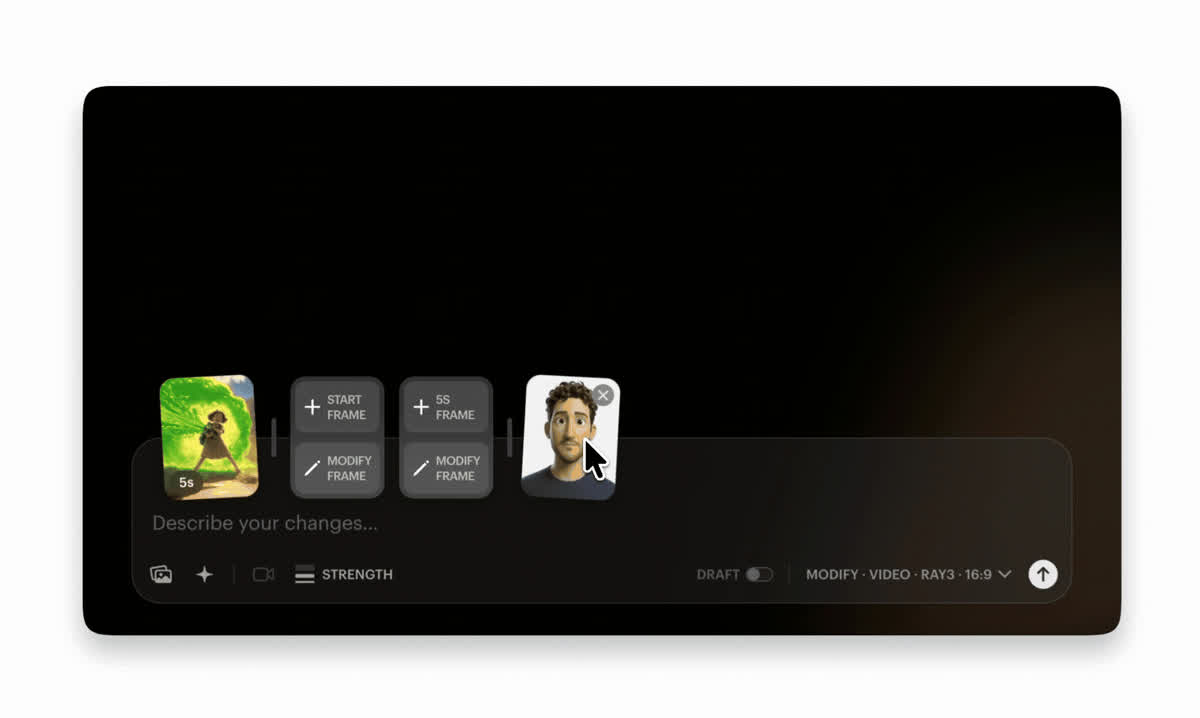
If a rehearsal, previs pass, phone plate, motion-control test, animation, or finished clip already contains useful timing and movement, start from the video. Luma describes Ray 3.2 Modify as a source-video transformation workflow: it preserves the clip's duration and can hold camera movement, performance, layout, and timing while changing style, materials, environment, or surface detail.
This reverses the writing task. The source already says when the performer turns and how the camera travels, so the prompt should describe the target appearance rather than retell the action. Luma's current workflow separates motion adherence from structure adherence and allows guide images at exact source-frame indexes. If the body motion is right but geometry drifts, strengthen structure; if timing loosens, strengthen motion; if a critical beat changes look, add a keyframe at that beat.
Video-to-video is not automatically the most controlled mode. It inherits defects as confidently as decisions: a poor camera path, ambiguous handoff, weak silhouette, rolling-shutter wobble, or mistimed performance remains the foundation. Shoot or animate the control plate for the intended transformation. Give the model clear contours, readable overlap, stable landmarks, and the movement you actually want to keep.
Do not stack controls without checking the trade
More inputs do not always mean more authorship. Controls can compete. Adobe's current Firefly video guidance notes that adding a first or last frame disables options including composition reference, motion reference, shot size, camera angle, and style; adding a style preset disables start and end frames. The interface is revealing an important production fact: one strong constraint can close another route to control.
Build a control card for every planned shot. Record the non-negotiable, selected generation mode, source assets, what each source is allowed to control, prompt, native settings, model and version, duration, aspect ratio, and the first review gate. Then add a release valve: which property may vary? A shot with no permitted variation is probably better built through conventional animation, VFX, virtual production, or live action.
Test the minimum viable control first. Text plus one clean frame may outperform text plus several contradictory references. Source video plus one corrected keyframe may hold more faithfully than a complete set of over-designed anchors. When a result fails, change one layer and label the reason. Otherwise the team cannot tell whether the improvement came from the prompt, image, mode, model, seed, or chance.

Review whether the chosen evidence survived
Review the clip against the reason its mode was selected. For text-to-video, ask whether the candidate reveals a useful direction. For image-to-video, compare frame zero, composition, light, and design before judging movement. For two-keyframe work, compare both endpoints and the physical logic between them. For ingredients, inspect identity and object details across the whole clip. For video-to-video, split review into timing, motion, structure, and transformed appearance.
Put the result in the cut. A shot can preserve every reference and still fail because its entrance is late, its endpoint does not hand off, its motion has the wrong weight, or the eye is pulled away from the story beat. Record failures with a controlled vocabulary—identity, composition, geometry, action, camera, timing, light, look, artefact, or edit—then revise the input layer that owns that category.
The buyer implication comes last. Ask suppliers for the shot control card, approved references, model and mode, selected output, rejected reason, and edit context. Price the workflow around approved-shot yield and repair effort, not generations alone. A supplier who can explain why a shot used video-to-video instead of twenty text attempts is selling repeatable cinematography rather than access to a render button.
Build
Control the shot before buying the render
Build a production workflow that connects each creative requirement to the right reference, generation mode, review gate, and approved output.
Launching a business of your own? Founder Launch OS connects the brand, offer, website and visual campaign in one guided Codex or Claude Code workspace.
Keep reading